

Native 8K Projector: Does It Exist, and Does Your Private Theater Need One?
The box says 8K. The chips inside count 4096 pixels across. Both statements are true, and the gap between them explains what you are really buying.
Sit in the front row of a 180" screen and lean forward. On a good native 4K projector you will not find a pixel. You will find the weave of a costume, the grain of the film stock, individual hairs backlit by the sun. Then someone asks whether the room should have an 8K projector instead, and the honest answer takes a little more than a yes or no.
Today's home theater projectors that carry an 8K label are native 4K projectors with pixel shifting. That is not a trick to hide. It is a real technology with real benefits, but it changes the question from “how many pixels” to “what makes a picture look real on your screen”.
What 8K means on a projector
Take JVC's flagship DLA-NZ900, one of the projectors we install in private theaters. Inside are three 0.69-inch native 4K D-ILA chips with 4096 × 2160 pixels each. JVC's 8K/e-shiftX technology then shifts the image by half a pixel in four directions, fast enough that the eye merges the positions into one picture. The result on screen is 8192 × 4320 addressable positions.
So the light passes through native 4K chips, and the projection carries 8K detail through shifting. The DLA-NZ800 uses the same approach. JVC's DLA-NZ700 and NZ500 are native 4K without 8K shifting.
We call it what it is: 8K e-shift on native 4K chips. It sharpens fine detail visibly on a large screen. It is not a reason on its own to choose a projector, and a native 4K projector with better contrast will often look more real.
Where 8K content comes from
Almost nothing you will watch in a private theater is delivered in 8K. 4K Blu-ray discs are 4K. Premium streaming services deliver 4K. Most feature films are finished on 4K masters, and many digital cinema releases are distributed in 2K or 4K. Native 8K material exists mainly as demonstration content.
That is why the scaling engine matters more than the number. An 8K-capable projector or a dedicated video processor takes a 4K or HD source and reconstructs it for the finer grid on screen. Done well, edges become cleaner and texture becomes more natural. Done badly, you get artificial sharpness that looks like video, not film.
When resolution starts to matter
Whether you can see a pixel depends on its size and your distance. A common rule of visual acuity is one arcminute: two points closer than that merge for a person with normal vision. Here is what that means for a 16:9 image, with 3840 pixels across in 4K and 7680 in 8K.
The calculation is simple: pixel width divided by the tangent of one arcminute. On a 180" screen a 4K pixel is about 1 mm wide, so it resolves only within roughly 3.6 m (11.8 ft). Many front rows in private theaters sit at about that distance from a screen this size, which is exactly where 8K shifting starts to show a smoother, more filmic texture. From the second row back, the difference shrinks quickly.
What matters more than pixel count
Contrast
The first thing the eye reads as realism is black. JVC quotes 150,000:1 native contrast for the DLA-NZ900, and in a dark room with dark finishes that is what makes a night scene look like night rather than gray. A room with white walls throws that advantage away before resolution ever matters.
Brightness on the screen
HDR needs light. The DLA-NZ900 is rated at 3,300 lumens, the NZ800 at 2,700. Screen size, gain and the room decide how much of that reaches your eyes, and a larger screen spreads the same light across more area.
The screen itself
An acoustically transparent woven screen lets speakers stand directly behind the image, but its weave must not compete with fine detail at your seating distance. Choosing the screen and the projector together is part of the design.
Calibration
A calibrated 4K image beats an uncalibrated 8K one every time. Color, gamma and HDR mapping are what make skin look like skin.
A 180" screen in practice
Emerald Cinema, our CEDIA Awards Winner 2026 for Best Home Cinema Level II, has a 180" acoustically transparent screen and a JVC projector in a custom ventilated hush box. Here the screen is large enough, and the front row close enough, for fine detail to matter. The result still depends on the whole chain: the dark Art Deco room, the screen and calibration to ISF practice.
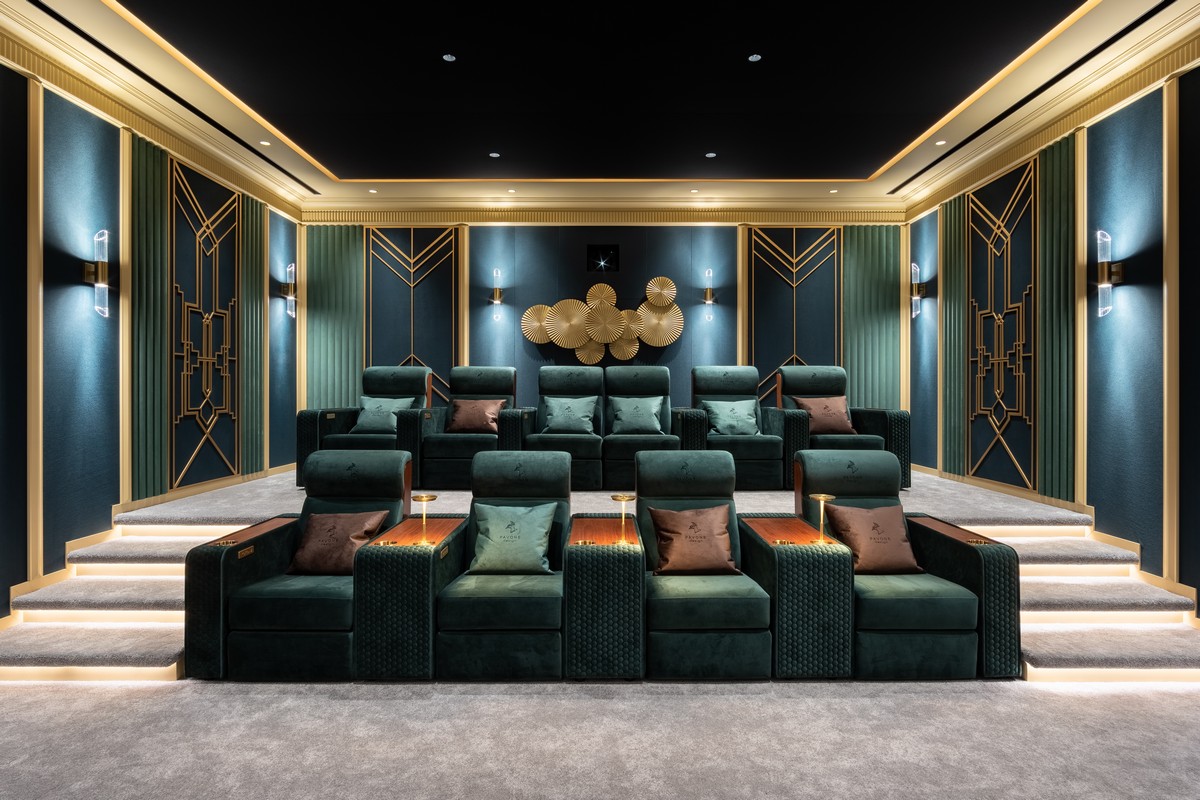
Emerald Cinema
If you are comparing projectors for a new room, our guide to JVC projectors for a private theater walks through the current models, and the 4K and 8K projectors page explains how we choose between projector platforms.


Tell us the screen size and seating plan, and we will show you whether 8K e-shift makes a difference in your room
Frequently asked questions
Is there a native 8K projector for a home theater?
The home theater projectors sold as 8K, such as JVC's DLA-NZ900 and NZ800, use native 4K chips and 8K e-shift pixel shifting to display 8192 × 4320 positions on screen. They are native 4K projectors with 8K display through shifting.
Is 8K e-shift worth it?
On large screens and with seats close to the image, yes: fine texture looks smoother and more natural. On smaller screens or from far back, the difference is small, and contrast and calibration matter more.
Can I watch 8K content in a private theater?
The projector can accept 8K signals, but almost all films and series are delivered in 4K or less. The real benefit comes from scaling 4K sources to the finer on-screen grid.
What screen size benefits from 8K?
Roughly from 150" upward, for seats within about one screen width of the image. On a 180" screen, 4K pixels become visible closer than about 3.6 m (11.8 ft).
Native 4K or pixel-shift 4K: which is better?
For a private theater we recommend native 4K chips. Pixel shifting on top of native 4K, as in 8K e-shift, adds detail. Pixel shifting on lower-resolution chips to reach 4K is a compromise for smaller rooms and budgets.